Tell me a Tiny Story: LLM Inference on a PowerMac G3
AI-generated content is everywhere now. Your morning Instagram doom-scrolling routine, those 47 unread emails in your inbox that arrived overnight, the friendly assistant that tells you that you are absolutely right - I'm sure at least some of that was powered by large language models. These are usually run on powerful hardware, in large fancy data centers consuming ridiculous amounts of power.
But what if I told you it's possible to run AI from the comfort of your own home, right on your PowerMac G3 workstation?
~/src/llama2.c % uname -srm
NetBSD 10.1 macppc

~/src/llama2.c % ./run sw-stories15M.bin \
  -z sw-tokenizer.bin \
  -i 'Mary had a little lamb.'
Mary had a little lamb.
She was very gentle and kind.
One day she was walking in the forest
when she saw something very strange.
There was a dragon
and it was making a loud roar.
(...)
achieved tok/s: 2.702613
Llama meets Blueberry
llama2.c is an implementation of Llama 2 LLM architecture, in just under 1000 lines of plain C. Written by Andrej Karpathy (ex Tesla, ex OpenAI engineer), it is a great learning resource for understanding LLMs.
blueberry is my humble PowerMac G3. It's big, blue and white, has a 400MHz PowerPC 750 processor and 704 megabytes of RAM (guess why the odd number), makes a comforting humming noise, and most people would say it belongs in a museum. Today, we will prove them wrong!
The inspiration for this experiment was a great and very detailed blog post by Andrew Rossignol, Thinking Different, Thinking Slowly. Andrew was successful in running LLM inference on his PowerBook G4 clocked at 1.5 GHz, under MacOS X (my guess is 10.5) with gcc 4.x.
I will try a different approach here. I don't have a fancy CPU with AltiVec extensions for parallel calculations, but I have NetBSD with a fairly modern compiler, gcc 10.5.
Big Endian Blues
Just like Andrew Rossignol, we will use TinyStories, very small models still able to generate coherent sentences. The models generate cute tiny stories, using easy words children can understand. We will be using stories15M.bin throughout the article.
So let's go!
% ./run ./stories15M.bin
malloc failed!
What is going on? The model is just 58M in size, so we have more than enough memory. Let's peek a little.
% gdb ./run
(gdb) b calloc
Breakpoint 1 at 0x1805320
(gdb) run ./stories15M.bin
Breakpoint 1, 0xfdd36980 in calloc () from /usr/lib/libc.so.12
(gdb) bt
#0  0xfdd36980 in calloc () from /usr/lib/libc.so.12
#1  0x01800dbc in malloc_run_state (s=0xffffe670, p=0xffffe624) at run.c:80
#2  0x0180180c in build_transformer (t=0xffffe624, checkpoint_path=0xffffee13 "./stories15M.bin") at run.c:168
#3  0x01804e14 in main (argc=2, argv=0xffffe924) at run.c:1062
(gdb) frame 1
#1  0x01800dbc in malloc_run_state (s=0xffffe670, p=0xffffe624) at run.c:80
80          s->x = calloc(p->dim, sizeof(float));
(gdb) p p->dim
$1 = 536936448
Why are we trying to allocate 537 megabytes here? We are reading the data wrong. Turns out the data in the model bin file is little endian, but the PowerPC CPU needs it big endian.
Looking at the big number 536936448, it is 20 01 00 00 when we write it in hex. If we swap the bytes, it's 00 00 01 20 hex, and 288 decimal. So, we should have asked for 288 bytes only!
Thankfully this is a solved problem. Andrew had the same issue on his PowerBook, and solved it by byte swapping the whole model file. Let's do the same thing! We'll use a little buffer to speed up the operation.
uint32_t buf;
FILE * fp;
size_t got;
while
% time ./byteswap ./stories15M.bin > ./sw-stories15M.bin
./byteswap ./stories15M.bin > ./sw-stories15M.bin  1.44s user 2.08s system 95% cpu 3.667 total
With the model file now byte-swapped, we get:
% ./run sw-stories15M.bin
failed read
Looking at the source code again, we can easily see this error comes from the build_tokenizer function. Basically, this means we have to byte-swap the tokenizer.bin file as well.
% time ./byteswap ./tokenizer.bin > ./sw-tokenizer.bin
./byteswap ./tokenizer.bin > ./sw-tokenizer.bin  0.02s user 0.03s system 88% cpu 0.048 total

% ./run ./sw-stories15M.bin -z ./sw-tokenizer.bin
failed read
Why are we getting the same error message? Turns out we can't just naively byte-swap the entire file here, we need a different approach for the tokenizer. The tokenizer.bin has a very simple data structure:
- max_token_length:
uint32 - vocab data - repeated
- vocab_score:
float32 - vocab_len:
uint32 - vocab:
char[vocab_len]
- vocab_score:
We have to byte-swap everything but the chars. We will do it like this:
uint32_t le = 0, be = 0;
// max_token_length - swap
;
be = ;
;
while
% time ./byteswap-tokenizer ./tokenizer.bin > ./sw-tokenizer.bin
./byteswap-tokenizer ./tokenizer.bin > ./sw-tokenizer.bin  0.08s user 0.04s system 95% cpu 0.120 total

% ./run ./sw-stories15M.bin -z ./sw-tokenizer.bin
Once upon a time, there was a playful puppy named Spot.
(...)
achieved tok/s: 2.56741
Looks like we got it right! The little G3, happily humming at 400MHz, is eager to tell us a story about a puppy.
Can we make it faster?
Right now, we are generating about 2.5 tokens (~ words) per second. Let's try some tricks to get more!
First, let's see where does the code spend the most time. NetBSD has support for code profiling with gprof. We have to build the code with -pg to include the required instrumentation. We also have to link it statically, otherwise we get very cryptic segfaults.
The magic spell is:
% cc -pg -o run run.c -lm_p -Bstatic -lc_p -Bdynamic
% ./run ./sw-stories15M.bin -z ./sw-tokenizer.bin
One beautiful story later, we notice a new file in current directory, gmon.out. The profiling instrumentation created this for us. The file has a binary format, but we can use gprof to generate a human-readable report:
% gprof ./run ./gmon.out > prof.txt
% head prof.txt
Flat profile:

Each sample counts as 0.01 seconds.
  %   cumulative   self              self     total
 time   seconds   seconds    calls   s/call   s/call  name
 95.51    231.05   231.05     7568     0.03     0.03  matmul
  1.97    235.81     4.76      176     0.03     1.37  forward
  0.93    238.06     2.25  7003744     0.00     0.00  __ieee754_expf
  0.54    239.36     1.30     6512     0.00     0.00  softmax
  0.30    240.09     0.73  7003744     0.00     0.00  expf
As the author helpfully notes, the code spends the most time (95%) multiplying matrices.
void
How do we multiply those matrices more efficiently?
How about using a GPU like the big boys?
The PowerMac G3 came with a graphics card that actually supported 3D acceleration, it was an ATI Rage 128 in a PCI slot. Sadly, we can't use it to speed up the calculations.
First of all, it has only 16 MB of Video RAM, so we won't be able to fit any sensible model in there, not even the TinyStories. Even if we could, there is no way to make the GPU multiply matrices the way we need. The GPU comes from the good old days when the goal was to process graphics, not run arbitrary code. There are no programmable shaders, no ALU exposed to software, and OpenCL didn't even exist yet when the card was designed.
We are stuck with the CPU
And quite a basic one at that. We have a single core, no hyper-threading, no AltiVec that helped Andrew Rossignol with his code, and we are not even close to his CPU clock.
Let's try anyway!
First, we will have a look at what Andrej Karpathy prepared for us. The Makefile provides multiple ways of compiling the code, with different optimization flags.
We will try and benchmark the code built with different flags, and see how many tokens per seconds can we get. We will use a constant random seed and a constant prompt, as follows:
% /run ./sw-stories15M.bin -z ./sw-tokenizer.bin -s 4321 -i 'One day, Lily met a kitten'
The result is an average of 5 runs.
Many kittens later
| compile flags | threads | make target | result (tok/s) |
|---|---|---|---|
| (no flags) | - | 0.724234 | |
-O3 | - | run | 2.40097 |
-Ofast | - | runfast | 2.56673 |
-Ofast -mcpu=native | - | 2.45614 | |
-Ofast -mcpu=750 | - | 2.55649 | |
-Ofast -fopenmp -mcpu=native | 1 | runomp | 2.44660 |
-Ofast -fopenmp -mcpu=native | 2 | runomp | 2.43310 |
-Ofast -fopenmp -mcpu=native | 4 | runomp | 2.40021 |
-Ofast -fopenmp -mcpu=native | 8 | runomp | 2.33497 |
-Ofast -fopenmp | 1 | 2.55344 | |
-Ofast -fopenmp | 2 | 2.53213 | |
-Ofast -fopenmp | 4 | 2.50887 | |
-Ofast -fopenmp | 8 | 2.41597 |
Note: For make target runomp to build, I had to change the original Makefile from -march=native to -mcpu=native.
Looking at the measurements we can draw some interesting conclusions.
First of all, we can see that OpenMP actually works against us here - the more threads we run, the slower the code gets. The reason is that the G3 processor has just a single core with no multithreading, so we don't really gain anything by spawning multiple threads to do calculations. Quite the opposite - we lose some precious CPU time on the thread switching overhead.
Next, we notice that adding -mcpu=native actually slows the code down. I don't really understand this phenomenon. My best guess is that gcc does not recognize the G3 CPU properly, and enables some more aggressive optimizations that work fine on newer PowerPC processors, but end up slowing down the code execution on my G3.
funroll-loops
You probably have seen the infamous funroll-loops.org (archived) website, making fun of a certain source-based Linux distribution and its users' uncanny obsession with chasing the best CFLAGS to achieve the ultimate optimization.
Now, we are going to do a similar thing. Let's rewrite matmul to unroll the inner loop and see if it has any effect on the code execution speed. The goal here is to have less loop iterations, which means less of "end of loop" tests and potentially faster code.
I also made variants with unrolls by 8 and by 16, these are trivial and omitted for brevity.
void
Another optimization we can introduce is adding a restrict keyword in the function signature. It's basically a promise that the pointer won't be used to point anywhere else.
Let's run some benchmarks with and without restrict.
void | compile flags | matmul implementation | result (tok/s) |
|---|---|---|
-Ofast | default | 2.56673 |
-Ofast | unrolled 4x | 2.70738 |
-Ofast | unrolled 4x + restrict | 2.70465 |
-Ofast | unrolled 8x | 2.82677 |
-Ofast | unrolled 8x + restrict | 2.83316 |
-Ofast | unrolled 16x | 2.65479 |
-Ofast | unrolled 16x + restrict | 2.67213 |
The restrict keyword does not give us any significant gains, but unrolling the loop helps a bit. Surprisingly, unrolling the loop by 16 makes the code run slower than by 8. It seems the CPU can't handle this many floats at once.
More optimizations
Let's keep the matmul unrolled by 8 with restrict keyword, and try some more gcc optimization flags now.
| compile flags | result (tok/s) |
|---|---|
-Ofast | 2.83316 |
-Ofast -ffast-math | 2.83292 |
-Ofast -ffast-math -fno-math-errno -fno-trapping-math -funsafe-math-optimizations | 2.83336 |
-Ofast -fno-tree-vectorize | 2.84139 |
-Ofast -fno-tree-vectorize -flto | 2.82912 |
-Ofast -fno-tree-vectorize -ffast-math -flto | 2.83372 |
-Ofast -fno-tree-vectorize -ffast-math -fstrict-aliasing -fschedule-insns -fschedule-insns2 | 2.83451 |
-Ofast -mcpu=750 -mtune=750 -fno-tree-vectorize -ffast-math -fstrict-aliasing -fschedule-insns -fschedule-insns2 | 2.84604 |
-Ofast -mcpu=750 -mtune=750 -funroll-loops -fno-tree-vectorize -ffast-math -fstrict-aliasing -fschedule-insns -fschedule-insns2 | 2.75862 |
-O3 -mcpu=750 -mtune=750 -funroll-loops -fno-tree-vectorize -ffast-math -fstrict-aliasing -fschedule-insns -fschedule-insns2 | 2.74943 |
The performance gains are marginal here, and enabling more optimizations does not mean faster code.
I don't think there is much more I can do at this point, short of learning enough PowerPC assembly to rewrite matmul in it.
We didn't cross the magic barrier of 3 tokens per second, but we learned a thing or two about a mostly forgotten processor.
Summary
With such a slow CPU and limited memory, we won't be able to run all those big fancy LLMs powering ChatGPT or Copilot.
The PowerMac won't help us vibe-code the next million dollar app, it won't write a perfect English language essay either.
We learned, though, that it is possible to run LLM inference even on very low-end machines. We did not break the barrier of 3 tokens per second, but were able to make the code run a little faster by methodically trying various kinds of optimizations and measuring the effects.
Post Scriptum: Hi kitten, I'm Lily
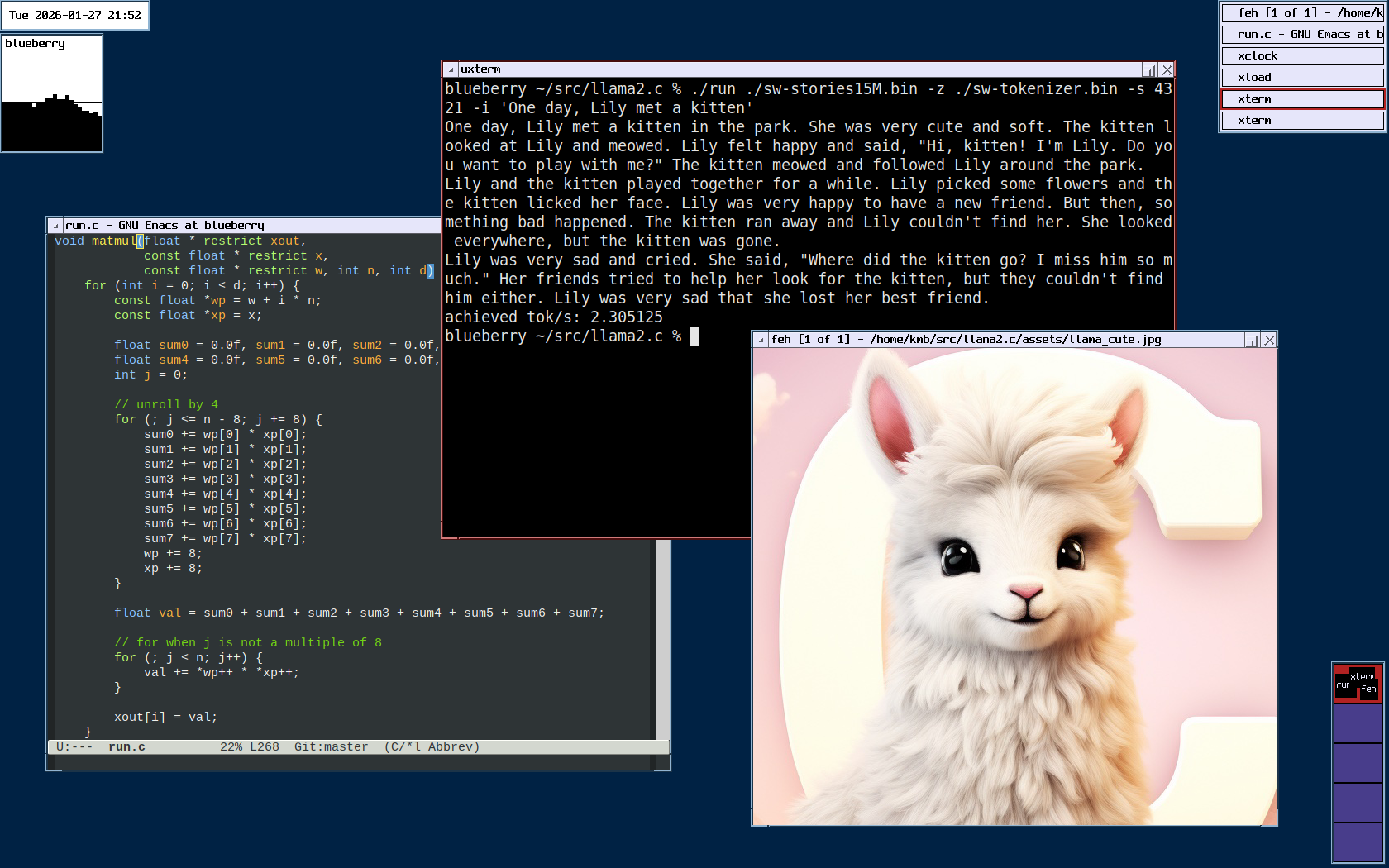
I had to watch this story scroll through my terminal many times as I was running my tests, so it feels right to share it with you all. Here it is in all its glory, a sad story of a lost kitten. I hope Lily finds her eventually!
One day, Lily met a kitten in the park. She was very cute and soft. The kitten looked at Lily and meowed. Lily felt happy and said, "Hi, kitten! I'm Lily. Do you want to play with me?" The kitten meowed and followed Lily around the park.
Lily and the kitten played together for a while. Lily picked some flowers and the kitten licked her face. Lily was very happy to have a new friend. But then, something bad happened. The kitten ran away and Lily couldn't find her. She looked everywhere, but the kitten was gone.
Lily was very sad and cried. She said, "Where did the kitten go? I miss him so much." Her friends tried to help her look for the kitten, but they couldn't find him either. Lily was very sad that she lost her best friend.